signal source / telegram

Your Telegram channel, traded by your own bot

Sign in with your own Telegram and pick one channel. Every new message that names your bot's market and a direction becomes a trade; chat, trade updates and other markets are skipped.

Any channel you are in
Market or Limit
Every signal logged
Gold Signals Room
12,480 subscribers
read by your bot
GOLD BUY NOW @ 4301.5
SL 4292 · TP1 4316
09:14
BUY XAUUSD · traded
TP1 hit ✅ move SL to entry, running to TP2
10:02
skipped · manages an open trade
EURUSD SELL 1.0850, tight stop
10:31
skipped · another market
XAU/USD SELL 4326.8
s/l 4335 · t/p 4310
11:06
SELL XAUUSD · traded
Gold Signals
XAUUSD · MT5
Active · Market
only XAUUSD is tradable
BUY
4,301.55
SELL
4,326.80
before you start

Three things, and one of them is your phone

Telegram has no webhook to paste. Your bot reads the channel through your own signed-in account, the way you would.

Your own Telegram account

You sign in with your phone number and the code Telegram sends to your app. Two-step password? It is used once and never stored.

A channel you are in

Any channel or group your account can read. You do not need to be its admin, and the channel never knows a bot is reading.

A bot with a broker and a market

The bot's own pair is the only thing it trades. Size, exits and Risk Management come from the bot, never the message.

what counts as a signal

A market and one direction. Everything else is skipped.

Message in the channel
Your gold bot
Why
🔥 GOLD BUY NOW @ 4310 SL 4300 TP1 4325
Traded
gold, a direction, levels
XAUUSD 🟢 LONG
Traded on Market
no levels: Limit skips it
TP1 hit ✅ move SL to entry
Skipped
talks about an open trade
EURUSD SELL 1.0850, tight stop
Skipped
another market
Gold — buy above 4350, sell below 4330
Skipped
both directions
Gold looking heavy today, thoughts?
Skipped
no direction
the names a gold bot answers to
XAUUSD
XAU/USD
XAU USD
GOLD
XAU

Your broker's spelling counts too: a bot on XAUUSD.sc or XAUUSDm still matches a message that says gold.

Buy, long, bull or call is a buy; sell, short, bear or put is a sell. A message with both is never guessed.

Prices are read from @ 4310, entry 4310 or a bare BUY 4310, with SL / stop and TP / target after them.

step by step

From an empty source slot to a channel your bot trades

All six steps happen in the bot editor, with your phone nearby for the sign-in code.

1
in Trader Frame

Add Telegram to your bot

  • Open your bot. With no source yet, Signal sources shows Add a signal source: press it.
  • Pick Telegram.
  • The Telegram panel opens. The slot fills once you press Trade this channel's signals in step 5.

Bot already has a source? Press the + under it instead. Each bot follows one channel.
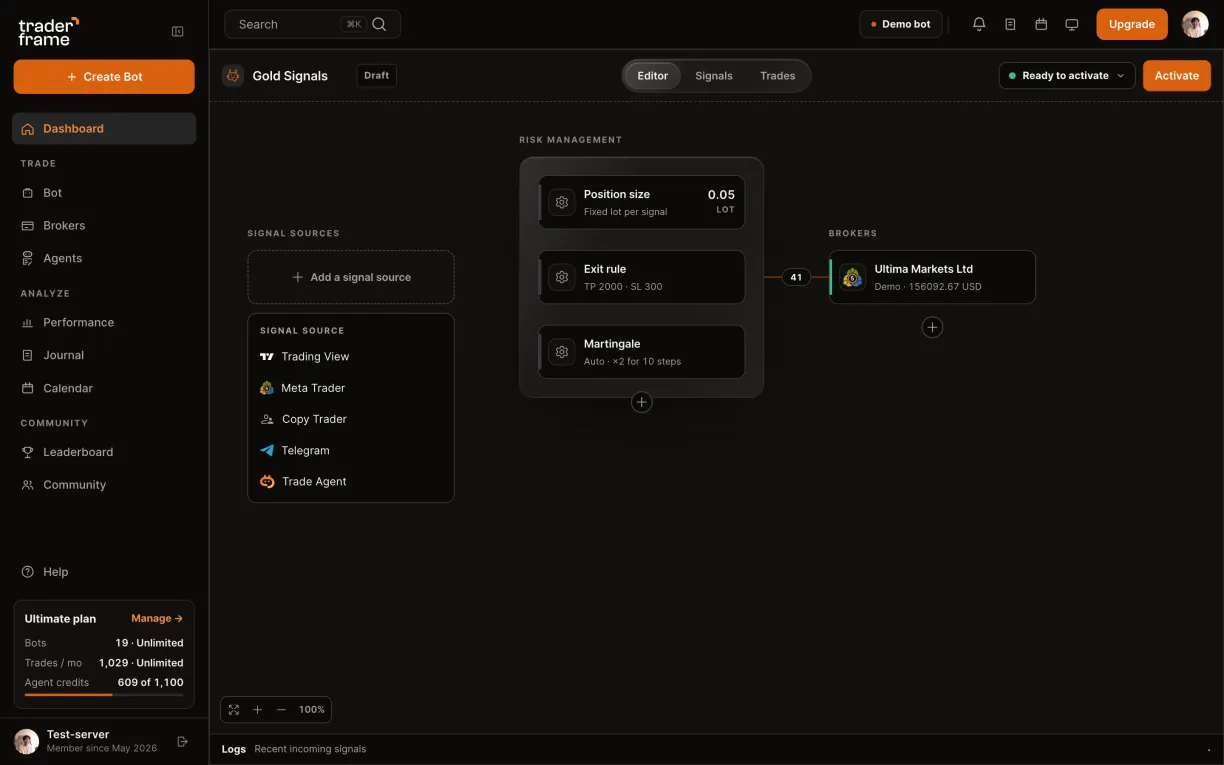
A bot with no signal source: pressing Add a signal source, picking Telegram, and the Telegram panel opening
2
in Trader Frame

Sign in with your own Telegram

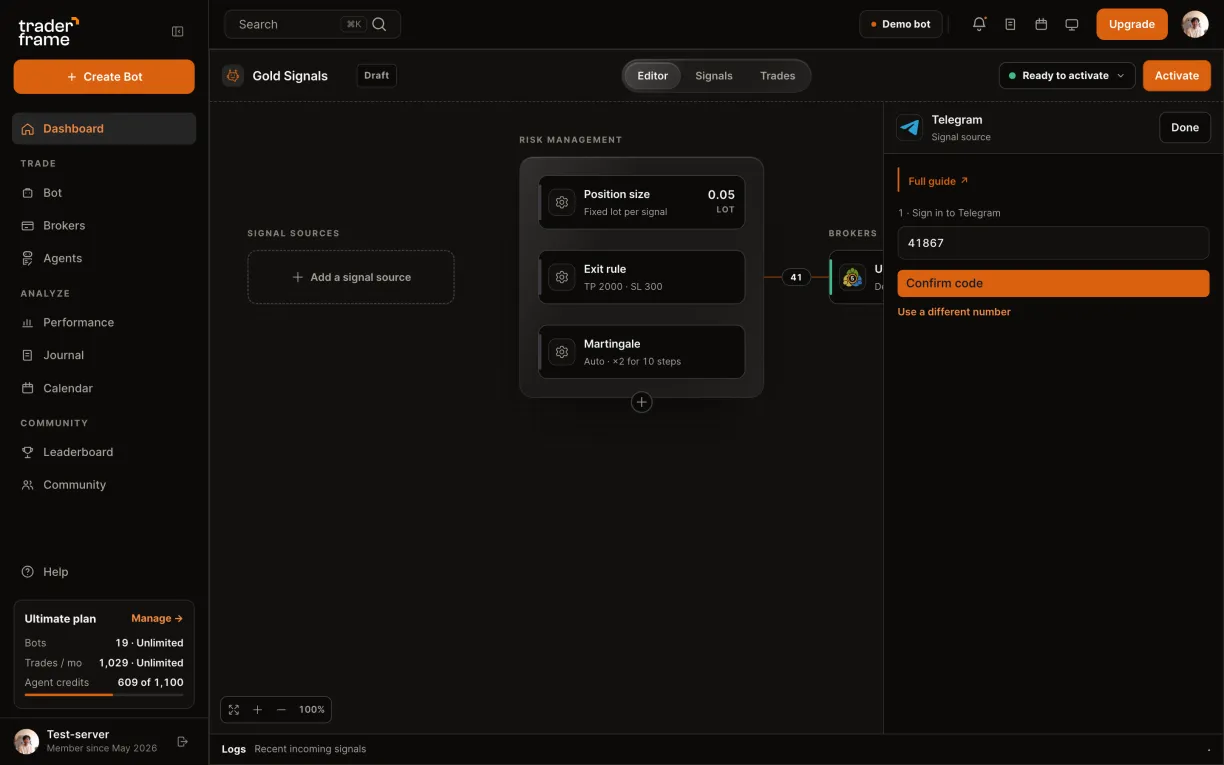
  • Type your phone number in international format, starting with +, and press Send me a code.
  • Telegram sends the code to your Telegram app, not by SMS. Type it and press Confirm code.
  • Two-step verification on? Enter that password too. It is used once and never stored.
The session can read your whole Telegram account. Disconnect logs it out at Telegram's end, so it leaves your Devices list too.
Typing a phone number, sending the code, typing the code Telegram sent, and the panel showing Connected
3
in Trader Frame

Pick the channel

  • Under 2 · The channel this bot follows, choose the channel. Every channel and group your account is in is listed.
  • One channel per bot. A second channel is a second bot.
  • The panel shows the one rule: only the bot's own pair, here XAUUSD, is tradable.

No instrument on the bot yet? Set it in Position size first: the button stays disabled until you do.
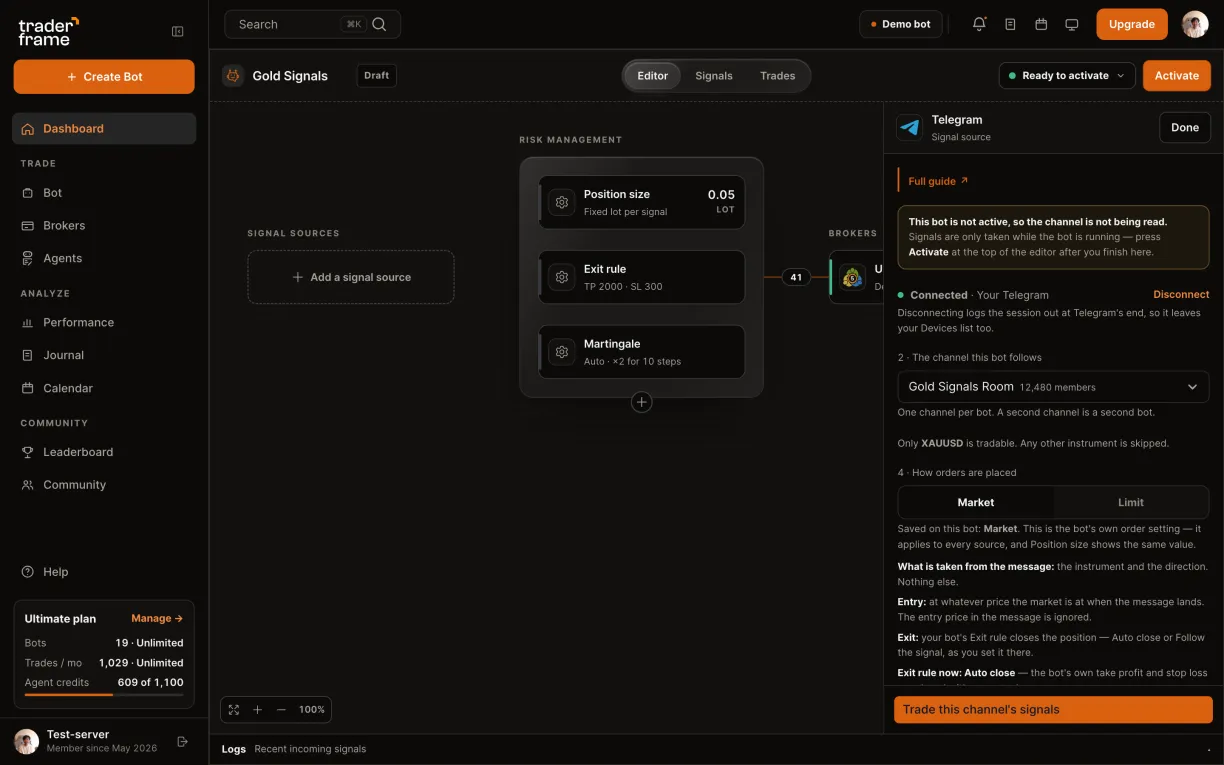
Opening the channel list, choosing Gold Signals Room, and the panel saying only XAUUSD is tradable
4
in Trader Frame

Choose Market or Limit

  • Market: only the market and the direction are taken. The trade opens at the current price and your bot's Exit rule closes it.
  • Limit: the message's entry, stop and target, all three, or the signal is skipped. The order waits at the channel's price with its stop and target on it.
  • Pick the one that matches how your channel posts.

This is the bot's own order setting, so Position size shows the same value. On Limit the Exit rule becomes Follow the signal.
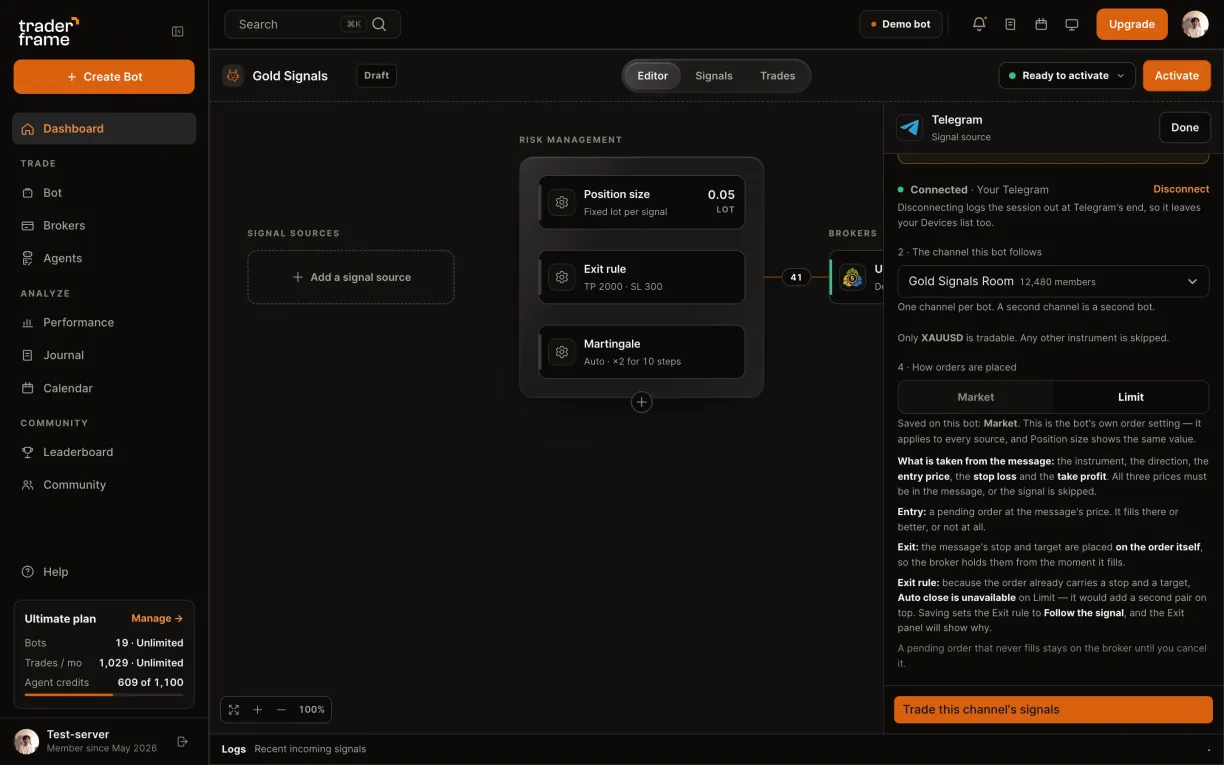
The Market explanation, then switching to Limit and its explanation
5
in Trader Frame

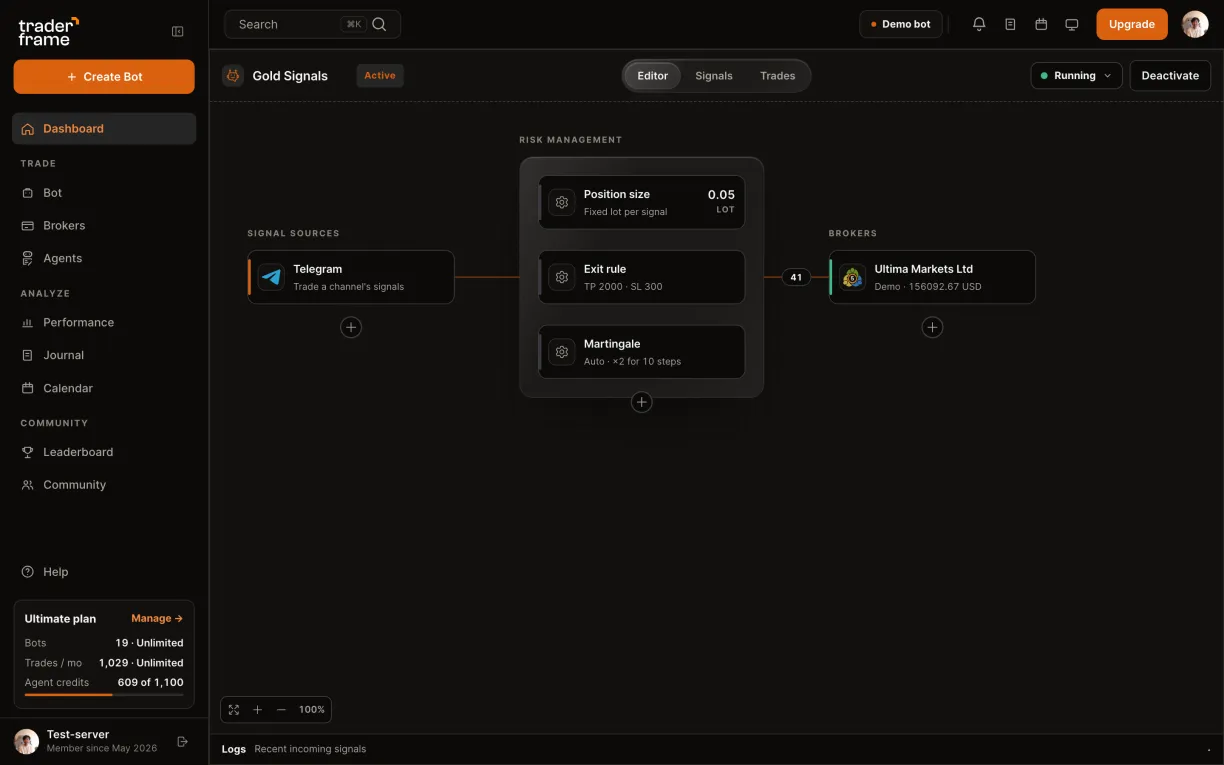
Connect, then switch the bot on

  • Press Trade this channel's signals. Telegram fills the Signal sources slot.
  • Press Activate. The channel is read only while the bot is running.
Messages posted while the bot is off are not traded later: the bot only reads calls that are fresh when they arrive.
Pressing Trade this channel's signals, Telegram filling the slot, then Activate
6
in Trader Frame

Watch the Signals tab

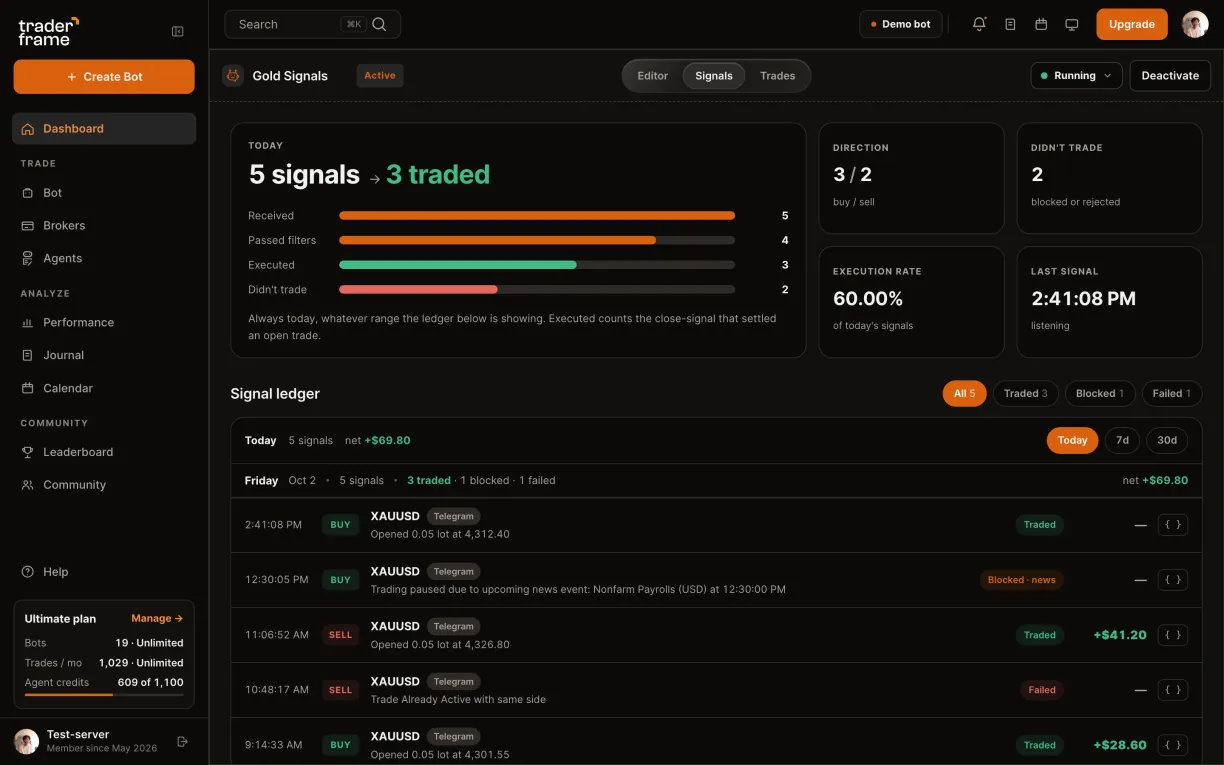
  • Every signal the bot took from the channel is listed: Traded, Blocked or Failed, with the reason.
  • Chat, trade updates and other markets are skipped before they reach the bot, so they leave no row.
  • The { } button shows the signal exactly as the bot received it.
The Signals tab: five Telegram signals today, three traded, one blocked by the news filter and one failed
market or limit

Pick by how your channel posts

Bare calls like "XAUUSD LONG" need Market. A channel that always posts entry, stop and target can run on Limit.

Market with Follow the signal places no stop and no target: the trade closes only on the channel's opposite call. Want a stop? Use Auto close.
Market
Limit
Taken from the message
The market and the direction
The market, direction, entry, stop and target
Entry
At the market price when the message lands
A pending order at the message's entry price
Stop and target
Your bot's Exit rule
The message's own, placed on the order
A call with no prices
Trades
Skipped
Exit rule
Auto close, or Follow the signal
Follow the signal only
troubleshooting

The channel posted, but nothing traded

Start in the bot's Signals tab. A row means the bot took the call; its reason says what stopped it.

What you see
Why
What to do
No row in Signals at all
The message was not a signal for this bot: chat, a trade update, another market or both directions. Or it was more than five minutes old when it arrived, or the bot was not Active.
Check the call names the bot's market and one direction, and that the bot is Active.
A Limit bot never trades
Limit needs entry, stop and target in the message, with the stop on the right side of the entry.
Switch to Market for a channel that posts bare calls.
Trade Already Active with same side
The bot already holds a trade in that direction.
Nothing to fix: the bot is protecting the open position.
Trading paused due to upcoming news event
Your news filter paused trading around a release.
Change the pause window in the bot's filters if you want those calls.
An edited call did nothing
Each message fires once. Edits never fire again.
Ask the channel to post the corrected call as a new message.
faq

Telegram questions

Can Trader Frame read my private chats?

The sign-in is your own account, so the session can read it. Your bot acts only on the channel you pick, and the session is stored encrypted and never sent back to any page. Disconnect logs it out at Telegram's end.

Do I need to be the channel's admin?

No. Any channel or group your account is in can be followed, and the channel never sees the bot.

Can a message close my trade?

Close messages like "close now" or "TP1 hit" are not read. Exits come from the bot's Exit rule, or on Limit from the stop and target on the order.

Can several bots follow one channel?

Yes. Each bot picks its own channel, and several bots can pick the same one, each trading its own market.

What does it cost?

The Telegram source is on every plan, Free included. Each trade the bot places counts toward your plan's monthly trades.

Does it trade old messages?

No. A call is only read if it is less than five minutes old when it arrives, so a restart never trades yesterday's calls.

next call

Your channel's next call could be a trade

Start on a demo account. When the channel has earned it, point the bot at your real one: the channel stays the same.