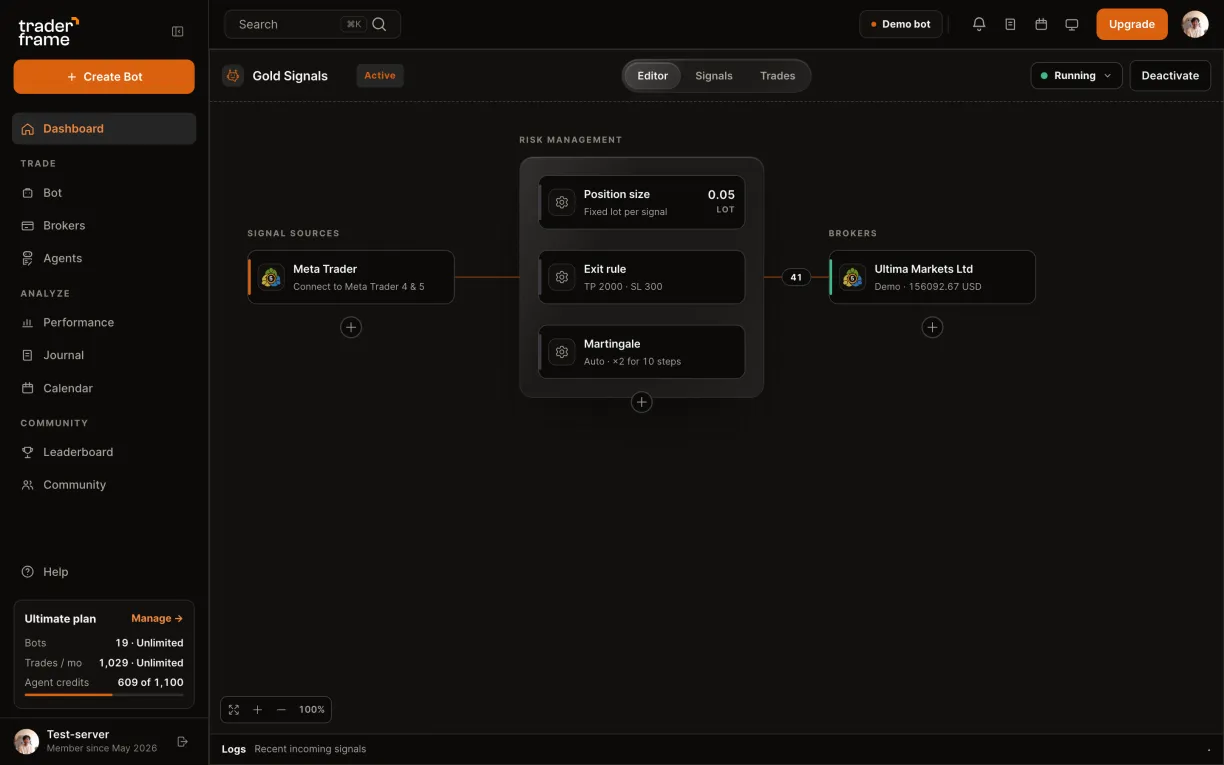
signal source / metatrader

Your MetaTrader indicator alerts, traded by your bot

Drop our free connector on the chart your indicator runs on. Each alert that names the chart's market and a direction is sent to your bot, which trades it on your broker with its own size and exits.
MetaTrader 4 and 5
Any indicator with alerts
Every signal logged
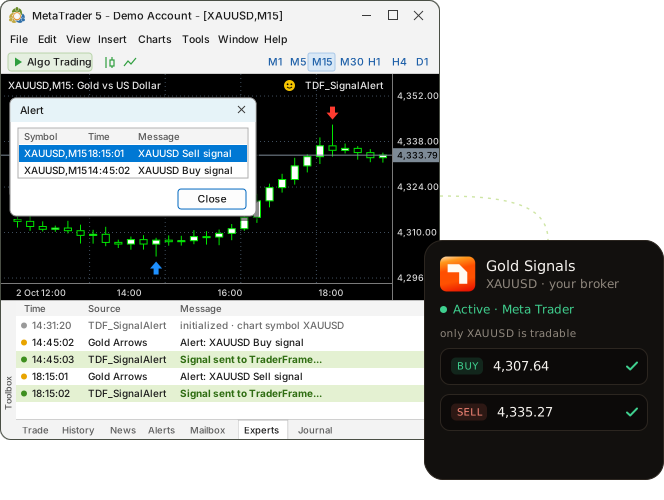
An XAUUSD Buy signal alert in MetaTrader 5, the TDF_SignalAlert connector logging Signal sent to TraderFrame, and a Trader Frame bot trading it
before you start

Three things, and one of them is your terminal

This is not the MetaTrader broker connection. Here MetaTrader is where signals come from; the bot can trade them on any broker it is connected to.

MetaTrader 4 or 5, left running

The connector lives in your own terminal, on your computer or a VPS. It only sends while the terminal is open.

An indicator that raises alerts

Any indicator whose alert names the chart's market and a direction, like "XAUUSD Buy signal". No coding for that.

A bot with a broker and a market

The bot's own pair is the only thing it trades. Size, exits and Risk Management come from the bot, not the indicator.

two connectors

Signal Alert for any indicator, Script Alert for your own code

Both are free Expert Advisors from the panel, for MT4 (.ex4) and MT5 (.ex5). They post the same message to the same webhook.

TDF_SignalAlert
start here

Signal Alert

Watches what your indicators already say.

How it listens
Reads the alert lines your indicators write to the terminal's Experts and Journal logs
Best for
Any indicator that pops an alert. No code.
Allow in MetaTrader
WebRequest for our URL, and DLL imports
The alert must name
The chart's market and a direction word
What you type
Only the webhook
TDF_ScriptAlert

Script Alert

Listens for an event you send on purpose.

How it listens
Receives a custom chart event your indicator or script sends
Best for
Your own code: call EventChartCustom with a Buy or Sell word
Allow in MetaTrader
WebRequest for our URL
The alert must name
A direction word; the chart's market is sent
What you type
Only the webhook
what gets sent

A direction word in the alert decides the side

Your indicator's alert
Sent to the bot
Why
Alert: XAUUSD Buy signal
call → buy
Buy is a CALL word
Alert: XAUUSD Bearish divergence
put → sell
Bearish is a PUT word
Alert: XAUUSD crossed the 200 MA
nothing sent
no direction word
Alert: EURUSD Buy signal
nothing sent
Signal Alert on an XAUUSD chart: another market
POST /v1/alerts/meta-trader/<bot>?secret=…
{
  "side": "call",  // call = buy, put = sell
  "symbol": "XAUUSD",  // the chart's market
  "entry": 4312.40  // the bid when it fired
}

The words are built in: Buy, Bullish or Call is a buy; Sell, Bearish or Put is a sell. The only thing you type is the webhook.

Broker spelling? filter_del_symbol removes characters from the chart's name and add_symbol_name adds a suffix, so XAUUSD.sc can be sent as XAUUSD.

step by step

From an empty source slot to alerts your bot trades

Seven steps: three in the bot editor, the rest inside MetaTrader.

1
in Trader Frame

Add Meta Trader to your bot

  • Open your bot. With no source yet, Signal sources shows Add a signal source: press it.
  • Pick Meta Trader.
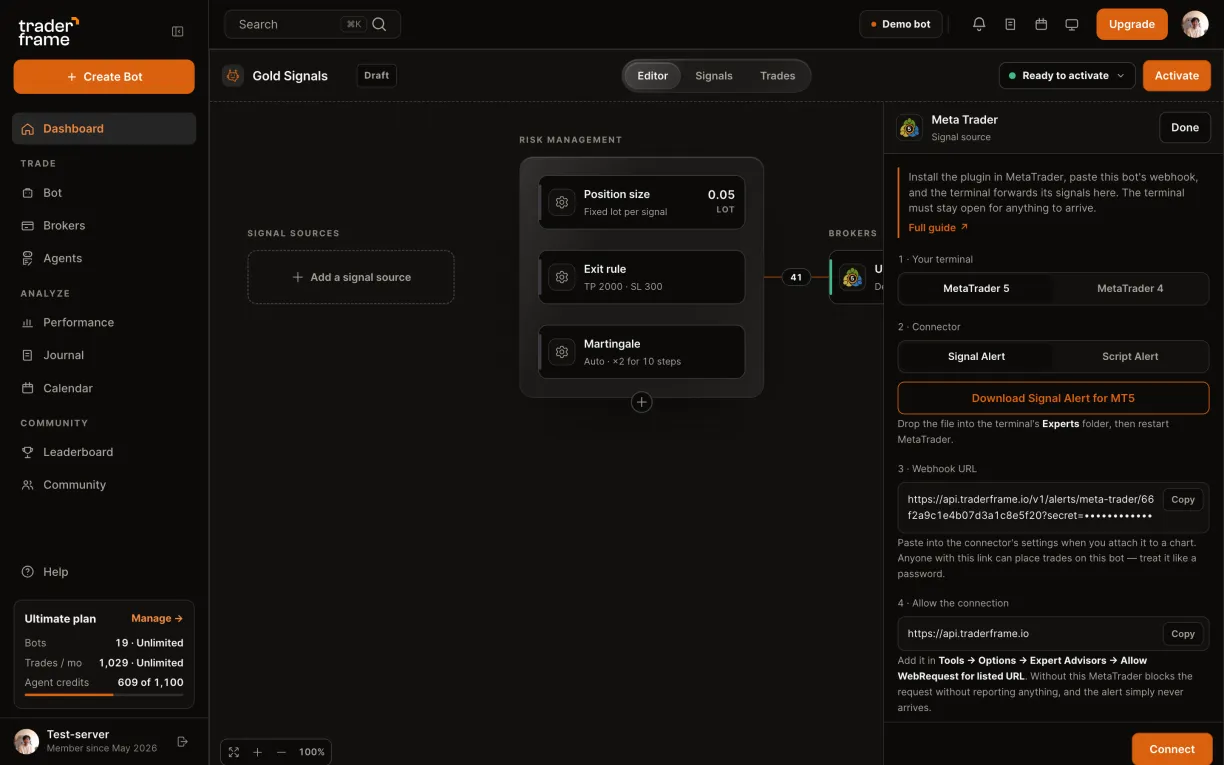
  • Its panel opens with everything the terminal needs: the connector, the webhook and the address to allow.

Bot already has a source? Press the + under it instead.
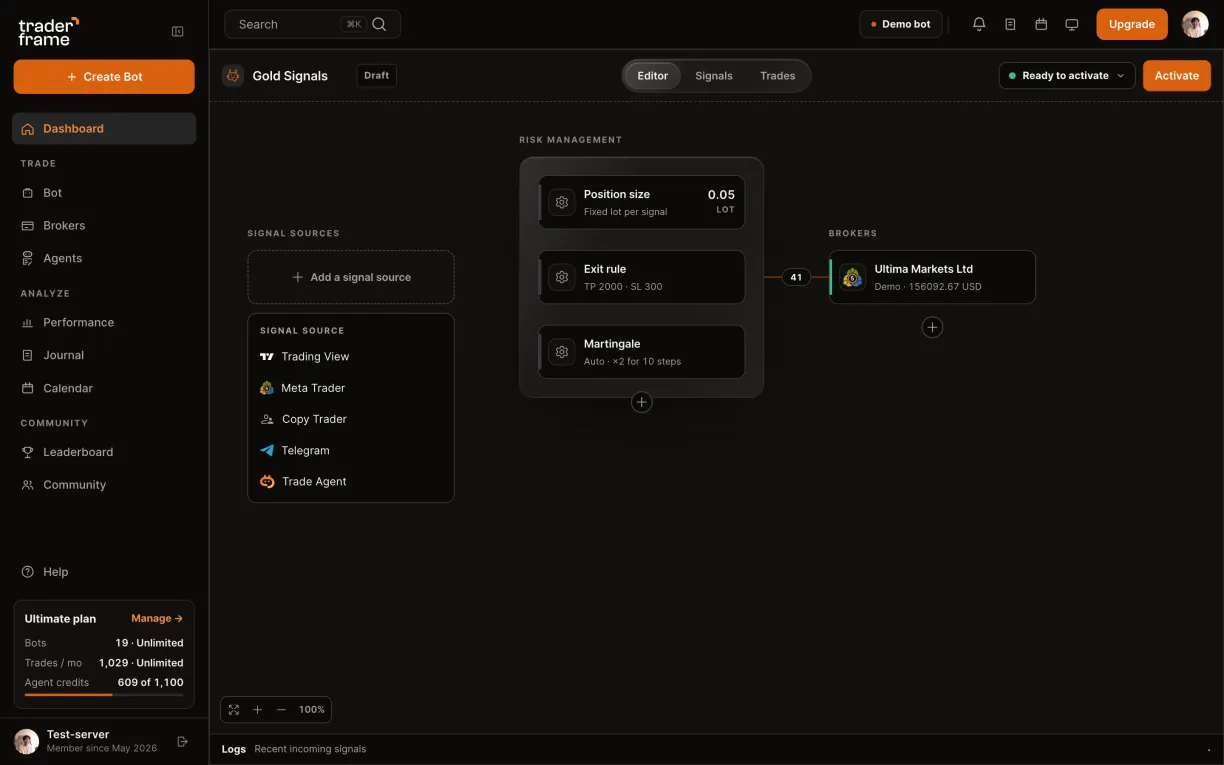
A bot with no signal source: pressing Add a signal source, picking Meta Trader, and its panel opening
2
in Trader Frame

Pick your terminal and download the connector

  • Under 1 · Your terminal, choose MetaTrader 5 or MetaTrader 4.
  • Under 2 · Connector, keep Signal Alert unless your own code sends chart events.
  • Press Download Signal Alert for MT5. It is a small .ex5 (or .ex4) file.
Choosing MetaTrader 5, looking at Script Alert then back to Signal Alert, and downloading the connector
3
in MetaTrader

Put it in the Experts folder

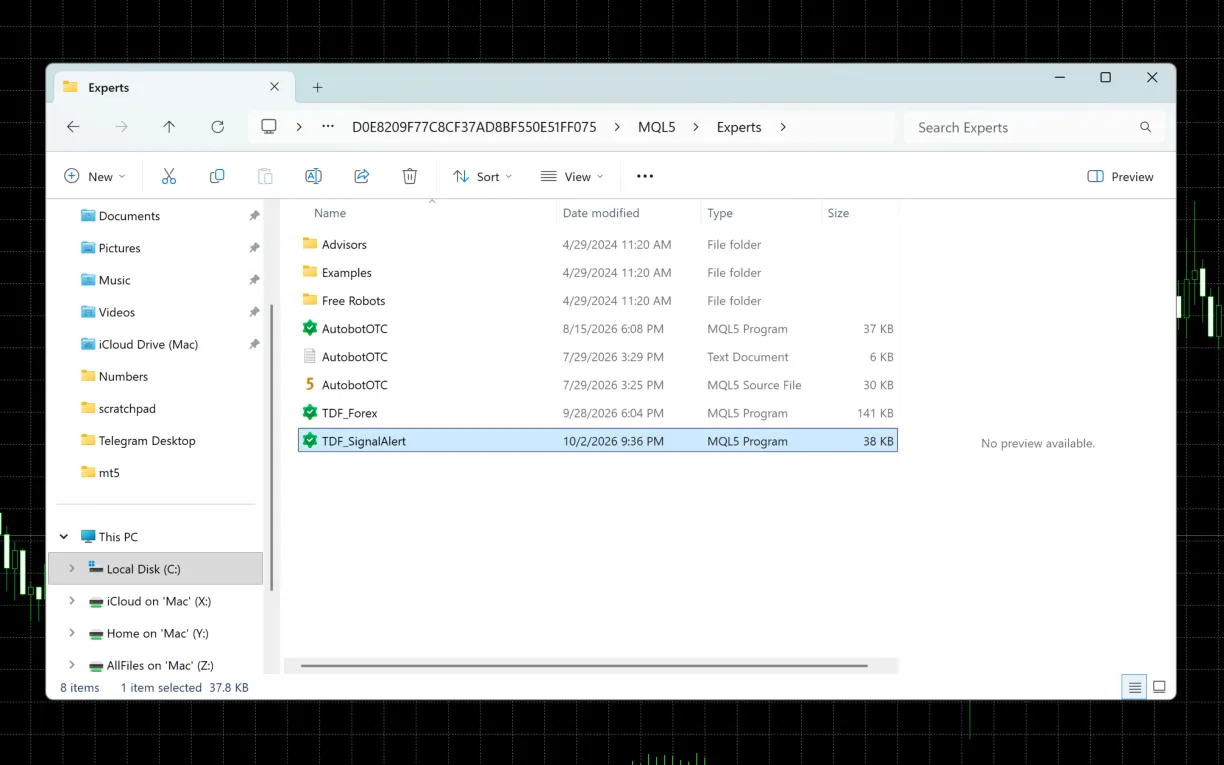
  • In MetaTrader, open File › Open Data Folder.
  • Go to MQL5 › Experts (MQL4 › Experts on MetaTrader 4) and drop the file in.
  • Restart MetaTrader. TDF_SignalAlert now shows under Expert Advisors in the Navigator.
MetaTrader 5: File, Open Data Folder, then the MQL5 Experts folder with TDF_SignalAlert in it
4
in Trader Frame, then MetaTrader

Allow the connection

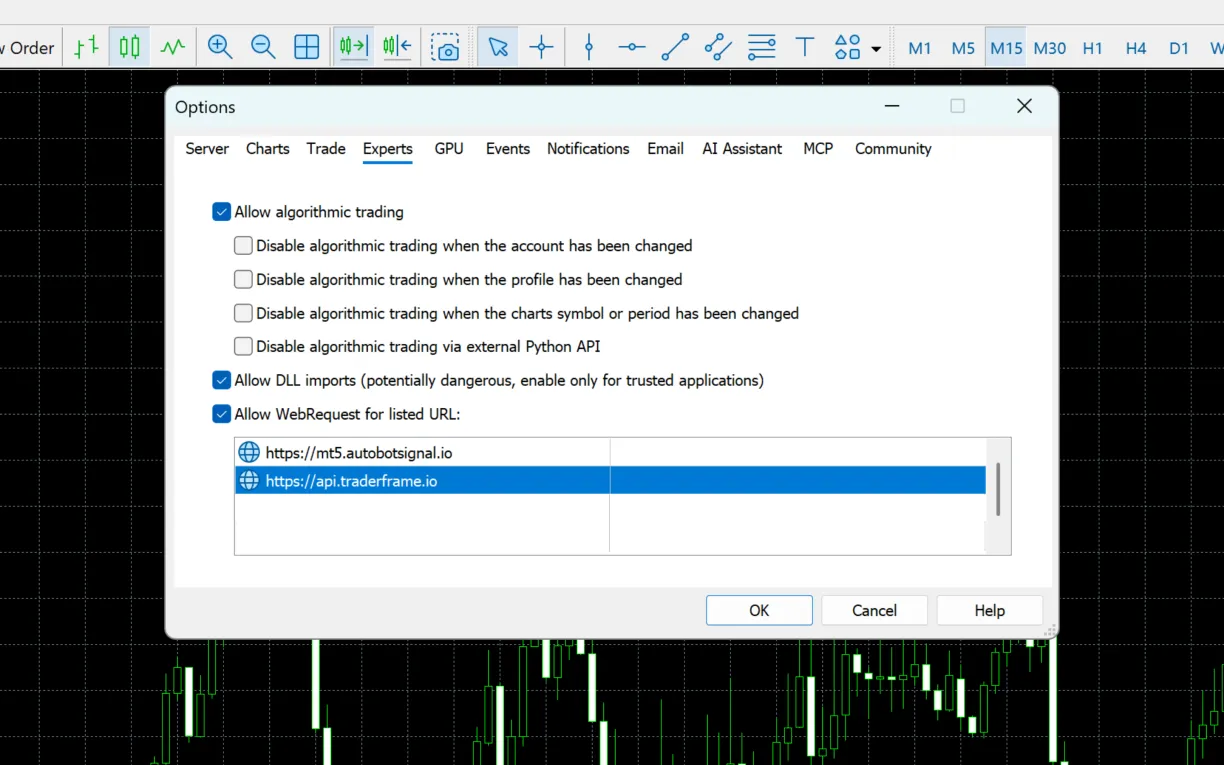
  • Copy the address under 4 · Allow the connection.
  • In MetaTrader, open Tools › Options › Expert Advisors, tick Allow WebRequest for listed URL and add it.
  • Tick Allow DLL imports too: Signal Alert reads the terminal's logs through it.
Skip this and MetaTrader blocks the request without telling you. The alert fires, and nothing arrives.
Copying https://api.traderframe.io from the panel, then MetaTrader 5 Options, Expert Advisors, with Allow DLL imports and Allow WebRequest ticked and the address listed
5
in MetaTrader

Attach it to your indicator's chart

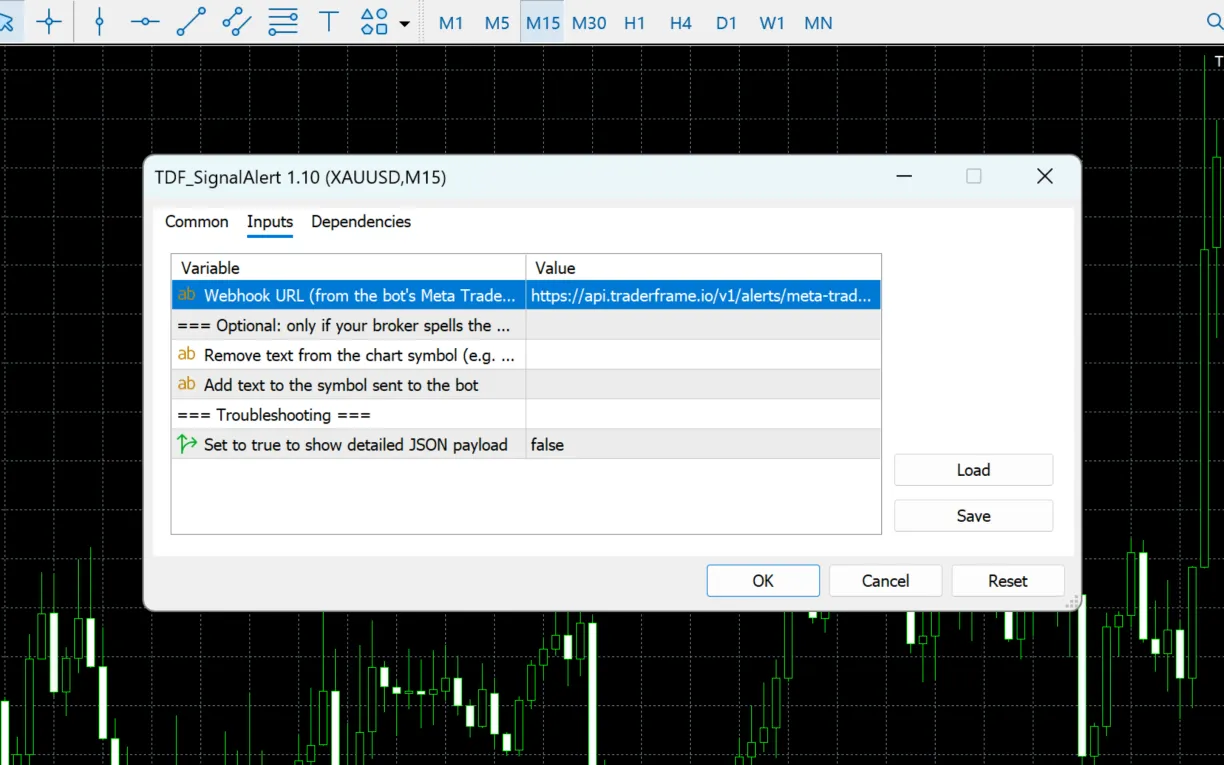
  • Drag TDF_SignalAlert onto the chart your indicator runs on. On Dependencies, tick Allow DLL imports.
  • Copy the webhook under 3 · Webhook URL and paste it into Webhook URL on Inputs, the one setting it asks for.
  • Press OK. A smiling face top right means it is running.
The webhook can place trades on this bot. Treat it like a password and never share a screenshot of it.
Copying the webhook from the panel, then the TDF_SignalAlert 1.10 dialog in MetaTrader 5: Allow DLL imports on Dependencies, and the webhook pasted into Webhook URL on Inputs
6
in Trader Frame

Connect, then switch the bot on

  • Back in the panel, press Connect. Meta Trader fills the Signal sources slot.
  • Press Activate. Signals are taken only while the bot is running.
Only alerts raised after the connector starts are sent, and only while the terminal is open. Close MetaTrader and the bot hears nothing.
Pressing Connect, Meta Trader filling the slot, then Activate
7
in MetaTrader, then TraderFrame

Watch an alert become a trade

  • When the indicator fires, the Experts tab logs Signal sent to TraderFrame...
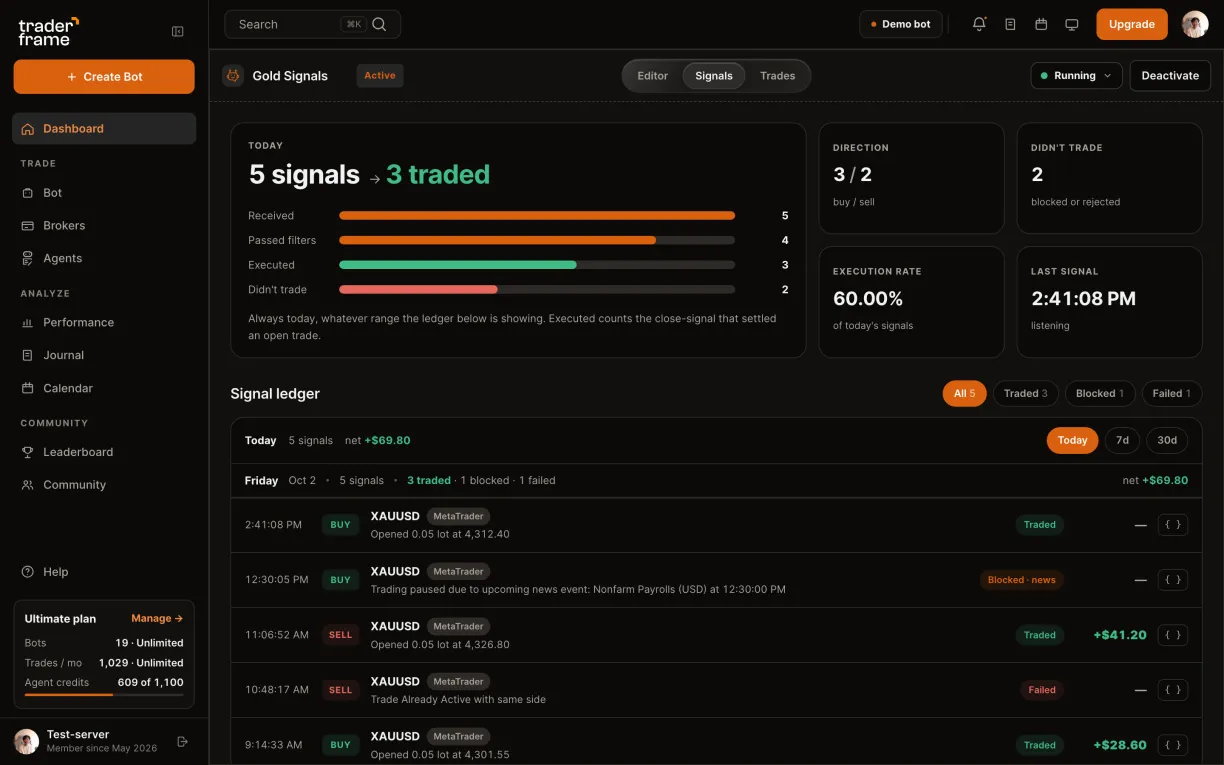
  • The bot's Signals tab lists every alert it received: Traded, Blocked or Failed, with the reason.
  • The panel's Once it is running line turns to Receiving, with the time of the last signal.
An XAUUSD Buy signal alert in MetaTrader and the connector logging Signal sent, then the Signals tab with five MetaTrader signals
troubleshooting

The indicator alerted, but nothing traded

Look in two places: MetaTrader's Experts tab says what the connector did, and the bot's Signals tab says what the bot did.

What you see
Why
What to do
The alert fires, nothing arrives
MetaTrader blocked the request: our address is not in Allow WebRequest, so it fails without a message.
Add https://api.traderframe.io in Tools › Options › Expert Advisors.
WebRequest failed, error code: …
The connector reached MetaTrader's web layer but the call failed. Shown in the Experts tab.
Check the address is listed exactly, and the webhook was pasted whole.
No valid CALL/PUT keyword detected in: …
Script Alert got an event with no direction word in it.
Make the event say Buy, Bullish or Call, or Sell, Bearish or Put.
Signal Alert never reacts
The alert does not name the chart's market, DLL imports are off, or it is on a different chart.
Attach it to the indicator's own chart, with Allow DLL imports ticked.
Invalid webhook credentials
The pasted webhook is old or cut short, so its secret does not match.
Copy the webhook again from the panel and paste it into Webhook URL.
Bot is not active
Signals are refused while the bot is paused or in draft.
Press Activate in the bot editor.
faq

MetaTrader questions

Does my computer have to stay on?

Yes, with MetaTrader open. The connector runs inside the terminal, so a VPS is the way to keep it running around the clock.

Is this the same as connecting an MT5 account?

No. That connects a broker account for trading. This one reads alerts from a terminal, and the bot can trade them on any broker it is connected to.

Which indicators work?

Signal Alert works with any indicator whose alert names the chart's market and a Buy or Sell word. Script Alert is for code that sends a chart event.

Can an alert close my trade?

There is no close message. Exits come from the bot's Exit rule; with Follow the signal, the opposite alert closes the trade.

Can one terminal feed several bots?

Yes. Each bot has its own webhook, so attach a connector per chart with that bot's webhook.

What does it cost?

The connectors are free and the source is on every plan, Free included. Each trade the bot places counts toward your plan's monthly trades.

next alert

Your indicator's next alert could be a trade

Start on a demo account. When the indicator has earned it, point the bot at your real one: the connector stays the same.