
Deriv integration · Rise and Fall on synthetic indices

Automate Options Trading on Deriv

Connect your Deriv demo or real account with a personal access token you make in Deriv: your password stays with you. Then build a bot that buys Rise and Fall contracts from your signals, with the stake, the contract length and the martingale recovery you set. Five steps, no code.
Demo or real
Synthetic indices around the clock
No password shared
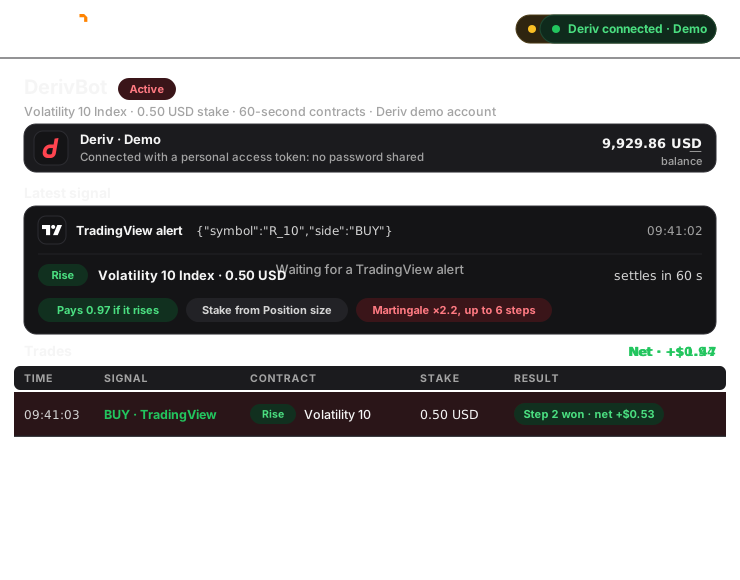
A Deriv demo account connected with its token, a TradingView buy alert on R_10 buying a 0.50 USD Rise contract on Volatility 10 Index for 60 seconds, and martingale recovery winning back the first loss on step 2
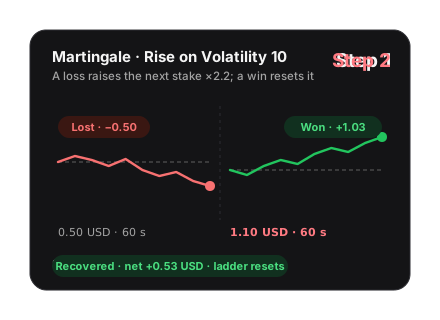
The martingale ladder: step 1 stakes 0.50 and loses, step 2 stakes 1.10 and wins, recovering the loss with a net of 0.53 USD, and the ladder resets

Before you start

What you need, and nothing to share

Deriv connects with a personal access token you make in Deriv’s developer dashboard. Your Deriv password never reaches Trader Frame.
A Deriv account

Demo with virtual funds, or real. One token reaches both, and each connects on its own.

A personal access token

Made in Deriv’s developer dashboard. It starts with pat_. Give it trading, never payments.
A signal source

TradingView or MetaTrader alerts, Telegram, Discord, Copy Trader, or Pip, the AI Trade Agent.

What happens to every signal
Your signal
Says buy or sell, and the market
Trader Frame
Stake, length and recovery from your bot
Deriv
Deriv
Buys the Rise or Fall contract

A buy signal buys Rise and a sell buys Fall. Your bot decides the stake, how long the contract runs and how it recovers after a loss; Deriv settles each contract when it ends.

Step by step

From a Deriv account to a bot trading Volatility 10 Index

Step 2 happens in Deriv, with the connect sheet open beside it. Demo and real accounts connect the same way.

01
Step 1 of 5

Pick Deriv in the connect sheet

  • Open Brokers and press + Connect broker.
  • Pick Binary, then Deriv, and press Continue.
  • Choose Demo for virtual funds, or Real for your live balance.

Demo and real connect as two accounts. Start on demo, then add real later with the same token.
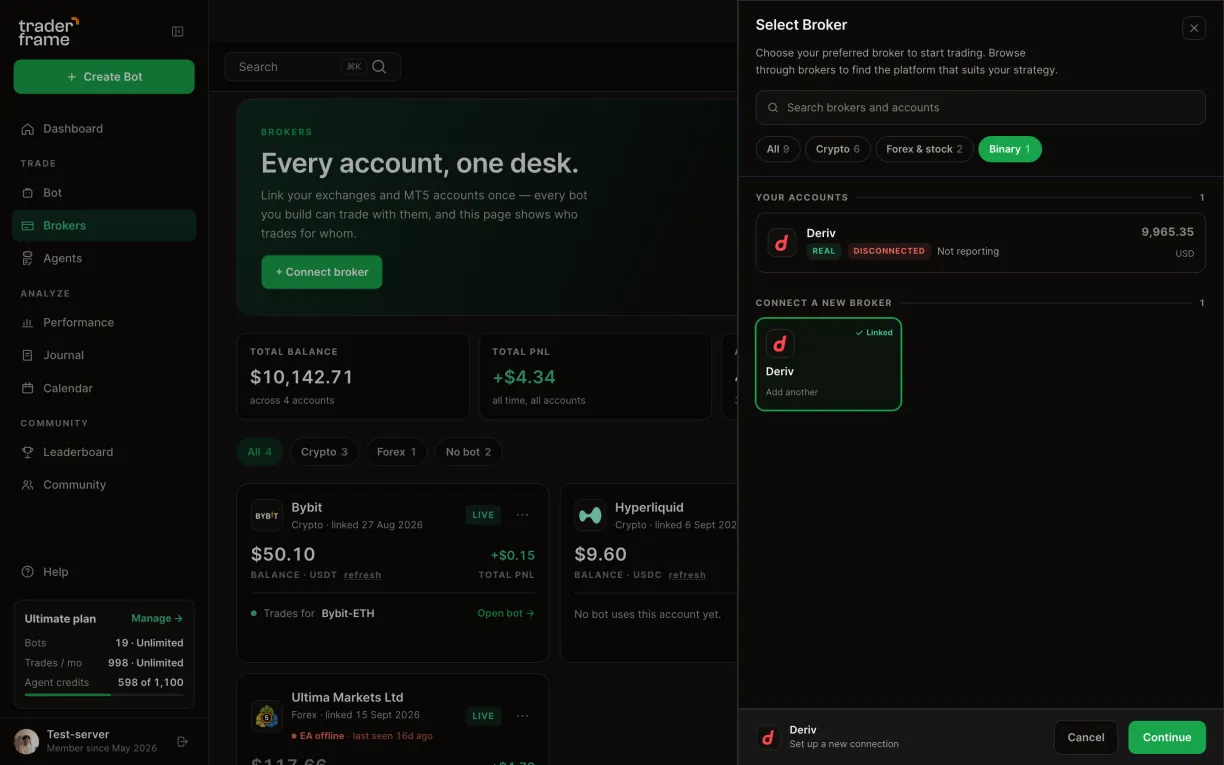
Opening the connect sheet from the Brokers page, picking Binary, then Deriv, pressing Continue, and choosing Demo
02
Step 2 of 5

Paste your Deriv token and connect

  • Press Need a key? Open Deriv and make a personal access token in the developer dashboard. It starts with pat_.
  • Give it trading access only. Never payments.
  • Paste the whole token into API token and press Connect.
  • Your Deriv account appears with its balance.

Treat the token like a password. Deleting it in Deriv’s dashboard cuts Trader Frame off at once.
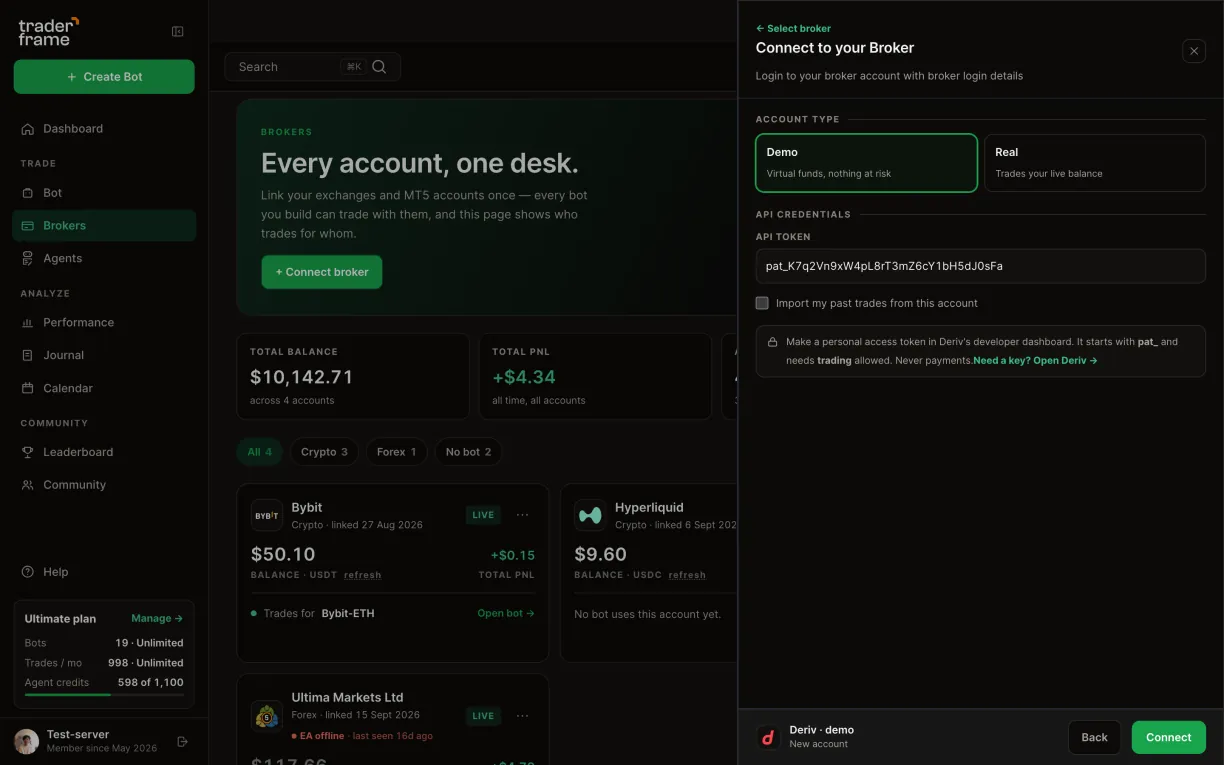
The token hint in the connect sheet, a pat_ token pasted into API token, pressing Connect, and the Deriv demo account appearing with its balance
03
Step 3 of 5

Build a Rise and Fall bot

  • Create a bot and pick your Deriv account under Brokers.
  • In Position size, pick the market, for example Volatility 10 Index.
  • Set the stake: a fixed amount from 0.35 USD, or a % of balance.
  • Set how long each contract runs: ticks, seconds, minutes, hours or days.

Synthetic indices like Volatility 10 trade around the clock. Forex and commodities close at the weekend.
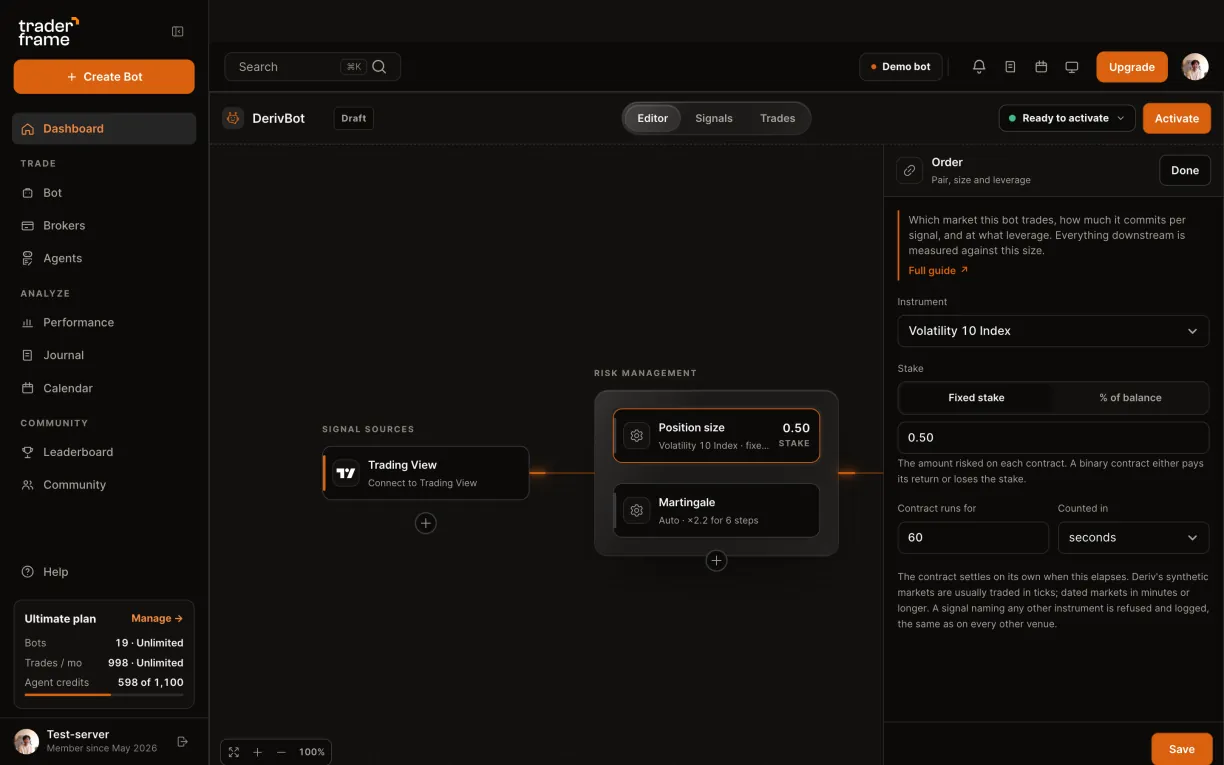
Picking the Deriv account for a bot, then Volatility 10 Index, a 0.50 fixed stake and a 60-second contract in the Position size panel
04
Step 4 of 5

Set the martingale recovery

  • In Martingale, set Recovery to Auto: after a loss, the next stake grows.
  • Choose when it re-enters: Right after the loss, or on the Next signal.
  • Set the multiplier and the most steps, for example ×2.2 for 6.
  • Check the table: what each step stakes, and the total if every step loses.
  • Press Save.

Martingale grows fast: at ×2.2, step 6 stakes 25.77 USD and the six steps commit 46.82 USD. Set the steps so that total is money you can afford to lose.
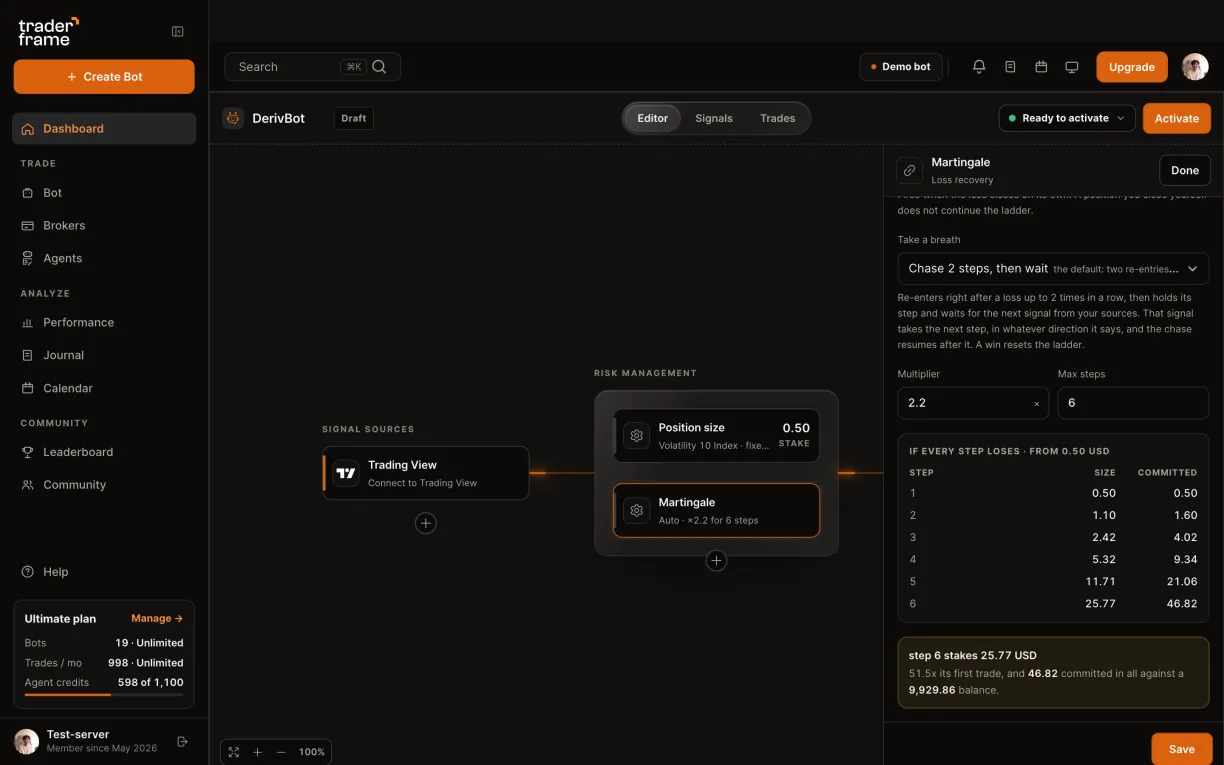
The Martingale panel: recovery set to Auto, re-entry right after the loss, a 2.2 multiplier for 6 steps, the stake table, then Save
05
Step 5 of 5

Add a signal and switch it on

  • Under Signal sources, add Trading View for your alerts.
  • Or add Meta Trader alerts, Telegram, Discord or Trade Agent.
  • Press Activate.

The bot runs on Trader Frame’s servers, so nothing has to stay open on your computer.
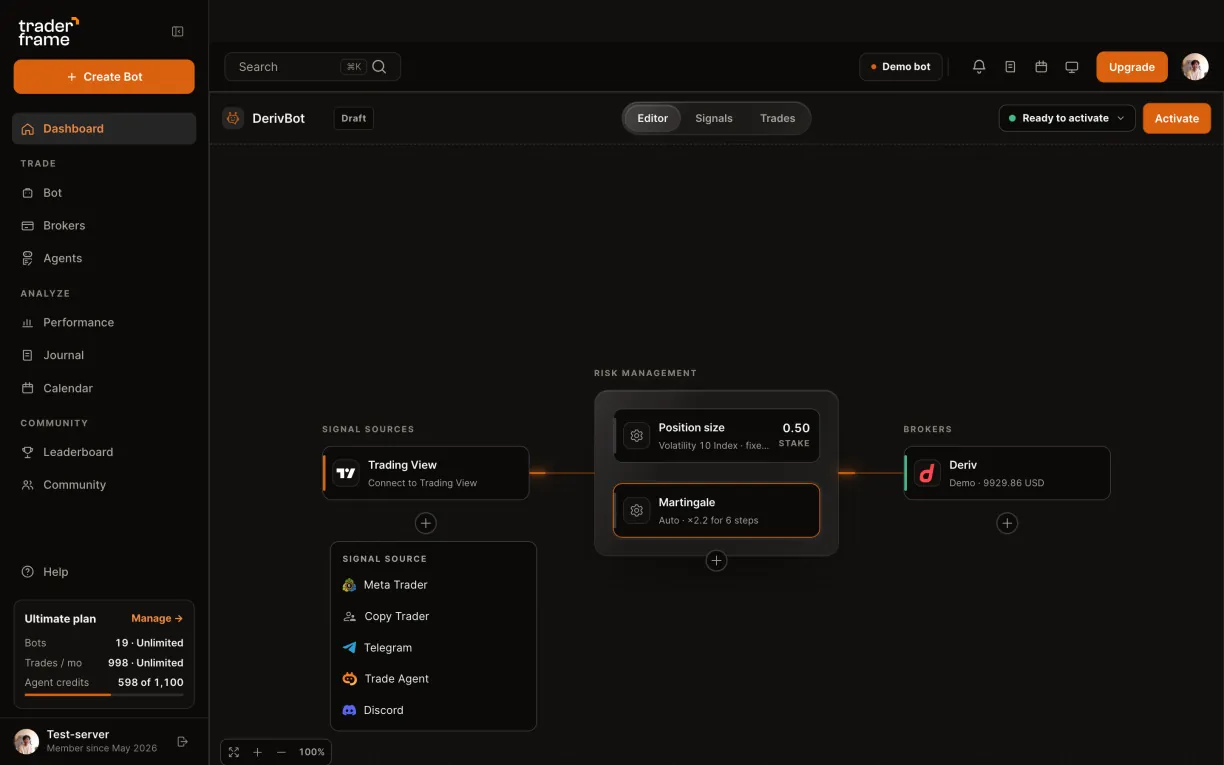
Opening the signal source menu with Meta Trader, Copy Trader, Telegram, Trade Agent and Discord, and pressing Activate

The alert message

The message only says buy or sell. The bot decides the stake, the contract length and the recovery.

TradingView
TradingView alert message · strategy
Copy it from the bot’s Trading View panel
{ "symbol": "{{ticker}}", "side": "{{strategy.order.action}}" }
TradingView
Indicator alerts · one per side
Buy buys Rise · Sell buys Fall
{ "symbol": "{{ticker}}", "side": "BUY" }
{ "symbol": "{{ticker}}", "side": "SELL" }

The alert only says buy or sell. The bot trades the market it is set to, with its own stake, contract length and recovery.

AI trading agent for Deriv

Meet Pip: an AI trading agent that trades Deriv inside your limits

Pip is Trader Frame’s Trade Agent. Add it to a Deriv bot instead of an alert: Pip reads the Volatility 10 Index market, decides when to buy Rise or Fall, and explains every decision. Your bot still sets the stake, the contract length and the recovery.

Suggest
Pip proposes the trade and you place it or skip it. A proposal expires after 5 minutes.
Enter
Pip buys the contract itself, inside your bot’s limits: stake, trading hours and plan.
Settle
The contract runs its full length and Deriv settles it. Your recovery takes over from there.
Add Pip to a Deriv bot
Pick Trade Agent under Signal sources

Can an AI agent trade Deriv for me?

Yes. Add Pip, the Trade Agent, to a Deriv bot as its signal source. Pip decides when to buy Rise or Fall; the bot buys the contract with your stake, length and recovery.

What does Pip read before a trade?

The market’s candles on several timeframes, and it explains every decision.

Does Pip manage the contract?

No. On Deriv a contract runs its full length and settles itself, so Pip decides the entry only.

How is Pip paid for?

Each look Pip takes uses agent credits from your plan. The Free plan has no agent.

Demo or real

One token, two accounts

Your Deriv token reaches your demo and your real account. Trader Frame connects each one on its own, so a bot proven on demo moves to real by changing its broker.

Demo
Real
How it connects
Your token, with Demo picked
The same token, with Real picked
Funds
Deriv’s virtual funds
Your real balance
Markets
The same markets as real
Synthetic indices, forex and more
Contracts
Rise and Fall, settled by Deriv
Your password
Never shared
Never shared

Keeping it running

Day to day on Deriv

Runs in the cloud

Trader Frame buys the contracts from its own servers. Your computer can be off; the bot trades while it is active.

Each contract settles itself

A contract runs the length you set, then Deriv settles it as won or lost. The result lands in the bot’s Trades tab.

Recovery resets on a win

Each loss moves the ladder up a step, up to your most steps. A win sends the next stake back to your base stake.

Markets keep their hours

Synthetic indices trade around the clock. Forex and commodities close at the weekend, and a signal while closed is refused with the reason.

Troubleshooting

What a message means, and what to do

Every refusal and skip is written to the bot’s Signals tab, with Deriv’s own reason.

What you see
Why
What to do
Connect fails: the token is refused
The token was copied in part, deleted in Deriv, or made without trading access.
Make a new token with trading allowed and paste it whole, with no spaces.
Connect fails: no demo or real account found
The token can’t see an account of the kind you picked.
Pick the other kind, or open that account in Deriv first.
Trade failed: the stake is too low
The stake is under Deriv’s minimum, often a % of a small balance.
Raise the stake to at least 0.35 USD.
Trade failed: the market is closed
Forex and commodities close at the weekend.
Trade a synthetic index, which runs around the clock, or wait for the open.
Trade failed: duration not offered
Not every market offers every contract length.
Pick a length the market offers, for example minutes instead of ticks.

FAQ

Deriv questions

Does Trader Frame see my Deriv password?

No. You connect with a personal access token you make in Deriv, and you can delete it there at any time.

What can the bot trade?

Rise and Fall contracts on the markets Deriv offers them on: synthetic indices around the clock, and forex and commodities in market hours.

Can I use my demo and my real account?

Yes. One token reaches both. Connect each one on its own, then point a bot at whichever you want it to trade.

How does martingale recovery work?

After a loss, the next stake is your multiplier times the last one, up to your most steps. A win sends it back to your base stake.

What does a contract pay?

Deriv quotes the payout before each buy. A win returns your stake plus the payout; a loss costs the stake.

Can MetaTrader alerts send the signals?

Yes. Add Meta Trader under Signal sources for alerts from your MT5 indicators, or use TradingView, Telegram, Discord or Pip.

Start on demo

Prove it on demo. Go real with the same token.

Connect your Deriv demo first. When the bot has earned it, connect your real account with the same token and point the same bot at it.