signal source / trade agent

An agent that reads every close and brings you the trade

Add the Trade Agent to a bot. It reads the chart when a candle closes, screens six playbooks for free, and asks the model only when a setup is on the table. Then it proposes, enters or manages, as far as you let it.

Suggest
you approve
Enter
within limits
Manage
owns the trade
looks on the close
1 · READ
14:15 · 15m close
XAUUSD candle closed
Levels, liquidity, gaps, the regime and the news clock.
2 · SCREEN
no credits used
Trend pullback · 78
best of six playbooks
3 · DECIDE
1 credit
Claude Sonnet 5 · conf 0.72
Holding the rising 50 EMA after two higher lows.
PROPOSED
expires 14:30
Buy XAUUSD 0.05 lot
entry 4311.4 · stop 4302.9 · target 4328.4
Skip
Place it
Placed on your broker
before you start

Three things the agent needs before its first look

Nothing to install and no keys to paste. The agent lives inside the bot, so the bot has to be ready first.

A Basic plan or higher

The Trade Agent comes with Basic, Standard, Pro and Ultimate. Free has no agent, and a trial carries no agent credits.

A bot with a broker and a market

The agent trades the bot's own pair on the broker you connected. Size, exits and Risk Management still come from the bot.

Agent credits for its looks

A look the model answers costs 1 credit on Claude Sonnet 5, 5 on Claude Opus 5. Engine skips cost nothing, and so does a look on your own model key.

how a look works

The engine screens for free. The model only sees a real setup.

Most closes end at step 2, so most looks cost nothing. You pay a credit only when there is something worth deciding.

1
free

Read

When a candle closes on the timeframe it enters on, the agent reads up to three timeframes: levels, liquidity, gaps, the candle, the regime and the news clock.

2
free

Screen

The engine checks six playbooks. Nothing on the table, or only setups your agent does not take: it skips with the reason, and no model is called.

3
1 or 5 credits

Decide

With a setup in hand, the model weighs it: enter or skip, levels, and a confidence. Your hard limits are checked before anything is sent.

4
by tier

Act

Suggest sends you a proposal. Enter places it within your limits. Manage also runs the open trade: size, stop, target, trail.

One morning on XAUUSD
4 looks · 3 credits · 2 trades worth asking about
09:45
Skip
Range-low touch, no rejection yet
model · 1 credit
10:15
Skip
No playbook between 4308 and 4326
engine rule · no credits used
11:30
Placed
Sell XAUUSD · liquidity sweep · 66
model · 1 credit
14:15
Proposed
Buy XAUUSD · trend pullback · 78
model · 1 credit
autonomy

Three rungs. Climb when it has earned it.

Start on Suggest. A trained Studio agent shows which rung it has earned on replays and paper, as in ready 72 · Enter earned.

Suggest

you approve

Nothing happens without your tap. Each entry arrives as a proposal with its reason and levels, in the app and in your notifications, with Place it and Skip.

  • Safe on a live account
  • A proposal expires if you do not answer
runs on: Every broker

Enter

within limits

The agent places entries itself, inside the hard limits. Once a trade is open, your bot's own Exit rule takes it from there.

  • Hard limits enforced by the engine
  • Prove it on a demo account first
runs on: Every broker

Manage

owns the trade

Everything Enter does, plus the open position: size on your martingale ladder, stop and target on the order, trailing, tightening or exiting early. It never widens a stop.

  • Never widens the stop
  • On binary brokers it records what it would have done
runs on: MetaTrader 5 and crypto
step by step

From an empty source slot to its first proposal

All six steps happen in the bot editor. The panel saves nothing until you press Add the Trade Agent.

1
in Trader Frame

Add the Trade Agent to your bot

  • Open your bot. With no source yet, Signal sources shows Add a signal source: press it.
  • Pick Trade Agent.
  • Its panel opens on the right. The slot fills once you press Add the Trade Agent in step 5.

Bot already has a source, like Discord or TradingView? Press the + under it instead. Step 3 shows how the two work together.
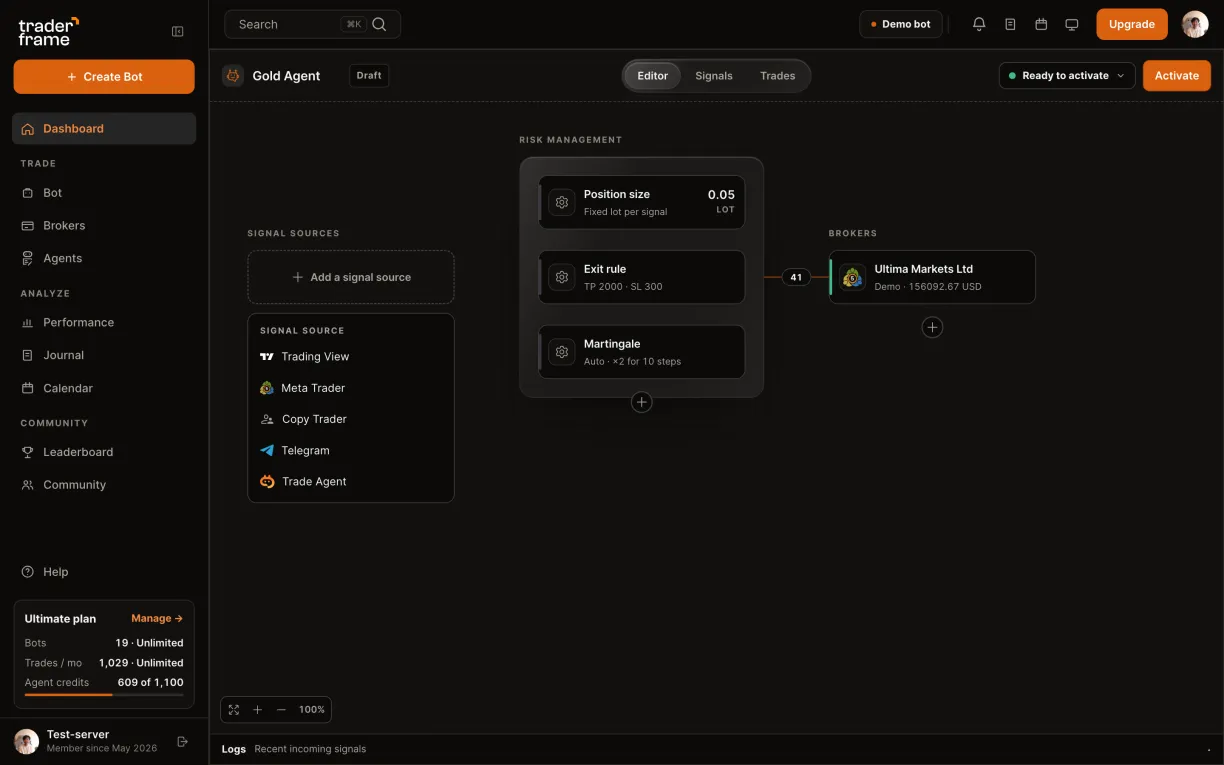
A bot with no signal source: pressing Add a signal source, picking Trade Agent, and its panel opening
2
in Trader Frame

Pick the agent and how far it goes

  • Agent: the stock agent, or one you trained in Agent Studio. A trained one shows what it has earned, like ready 72 · Enter earned.
  • Autonomy: Suggest waits for your tap, Enter places entries within your limits, Manage also runs the open trade.
  • Start on Suggest. Move up once the decisions log shows calls you agree with.

Training your own agent comes with Standard and up. Manage works on MetaTrader 5 and crypto; on binary brokers it records what it would have done.
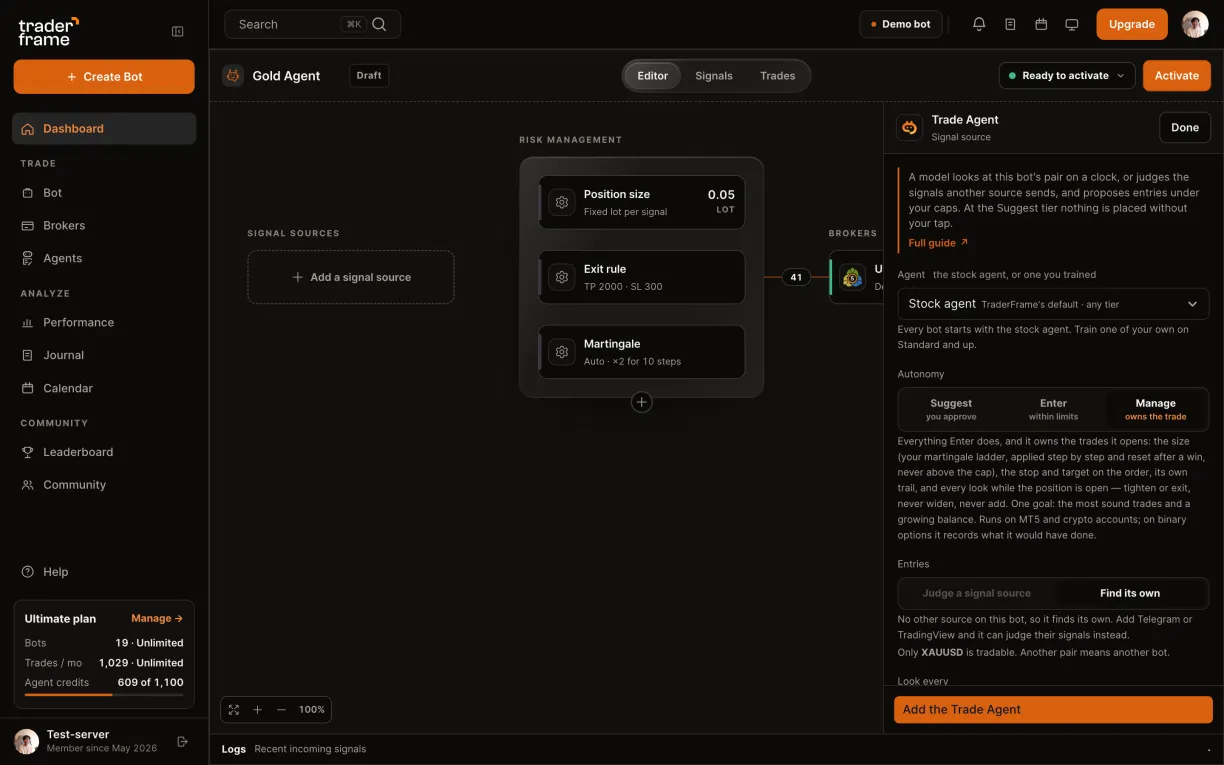
In the Trade Agent panel: the Agent menu with the stock agent and trained agents, then the Suggest, Enter and Manage tiers
3
in Trader Frame

Let it find trades, or judge a signal

  • With no other source on the bot, Entries is Find its own: the agent looks for trades itself.
  • Look every: 5, 15, 30, 60 or 240 minutes, on the candle close.
  • Only during: keep it to the Asia, London or New York session. Crypto can run all day.

Add Telegram, Discord or TradingView to the bot and Judge becomes the default: every signal from that source waits for the agent, which takes it or skips it with a reason.
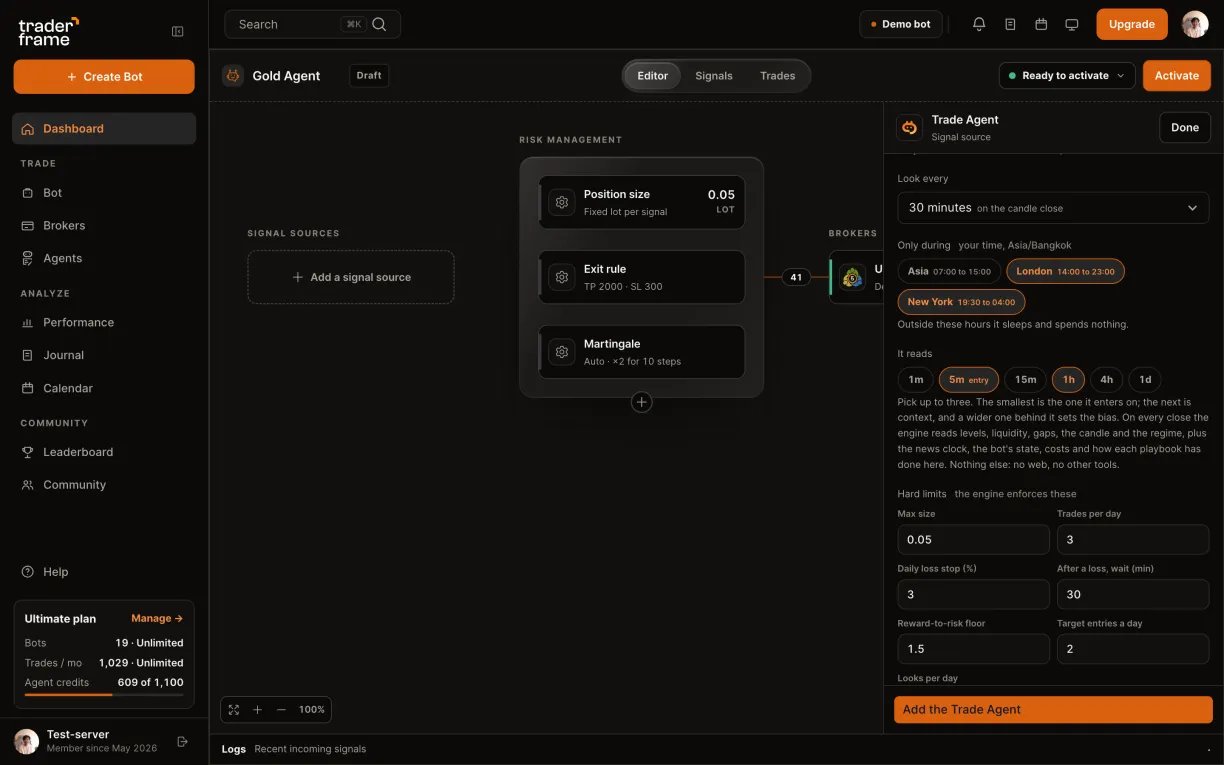
Entries set to Find its own on a bot with no other source, then the look interval and the London and New York sessions
4
in Trader Frame

Set what it reads and its hard limits

  • It reads: up to three timeframes. The smallest is the one it enters on; a wider one sets the bias.
  • Hard limits: max size, trades per day, a daily loss stop, a wait after a loss, a reward-to-risk floor, target entries a day and looks per day.
  • The engine enforces these on every order. The model cannot talk its way past them.

Your bot's Risk Management, the news filter and your plan's limits still apply on top. Every agent order walks the same path as a TradingView alert.
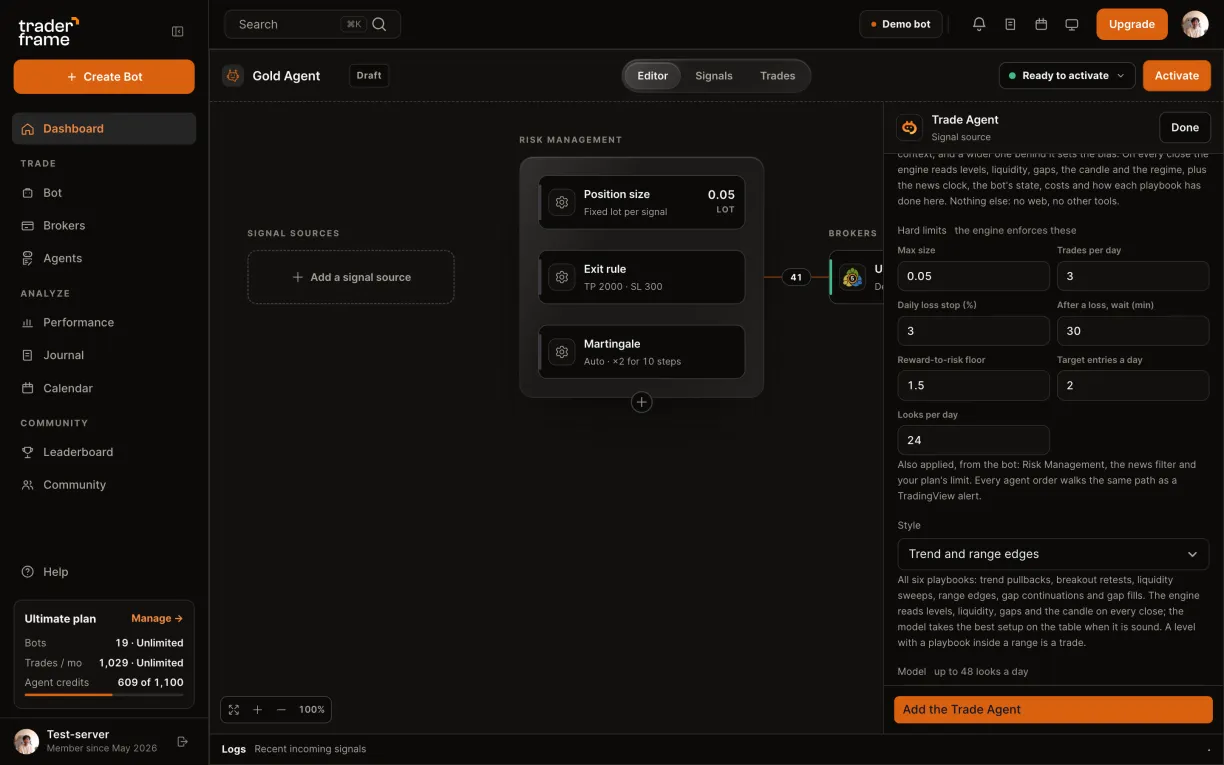
The It reads timeframes, then the hard limits filled in: 0.05 max size, 3 trades a day, a 1.5 reward-to-risk floor
5
in Trader Frame

Pick the model, then add the agent

  • Style: all six playbooks, trend only, scalp on 5 minutes, or swing.
  • Model: Claude Sonnet 5 at 1 credit a look, or Claude Opus 5 at 5.
  • Tell me about: entries and proposals, every look, or a daily summary. Link Telegram to get proposals there too.
  • Press Add the Trade Agent. It fills the empty Signal sources slot.

Using your own Anthropic, OpenAI or Google key? Looks on your key cost no credits.
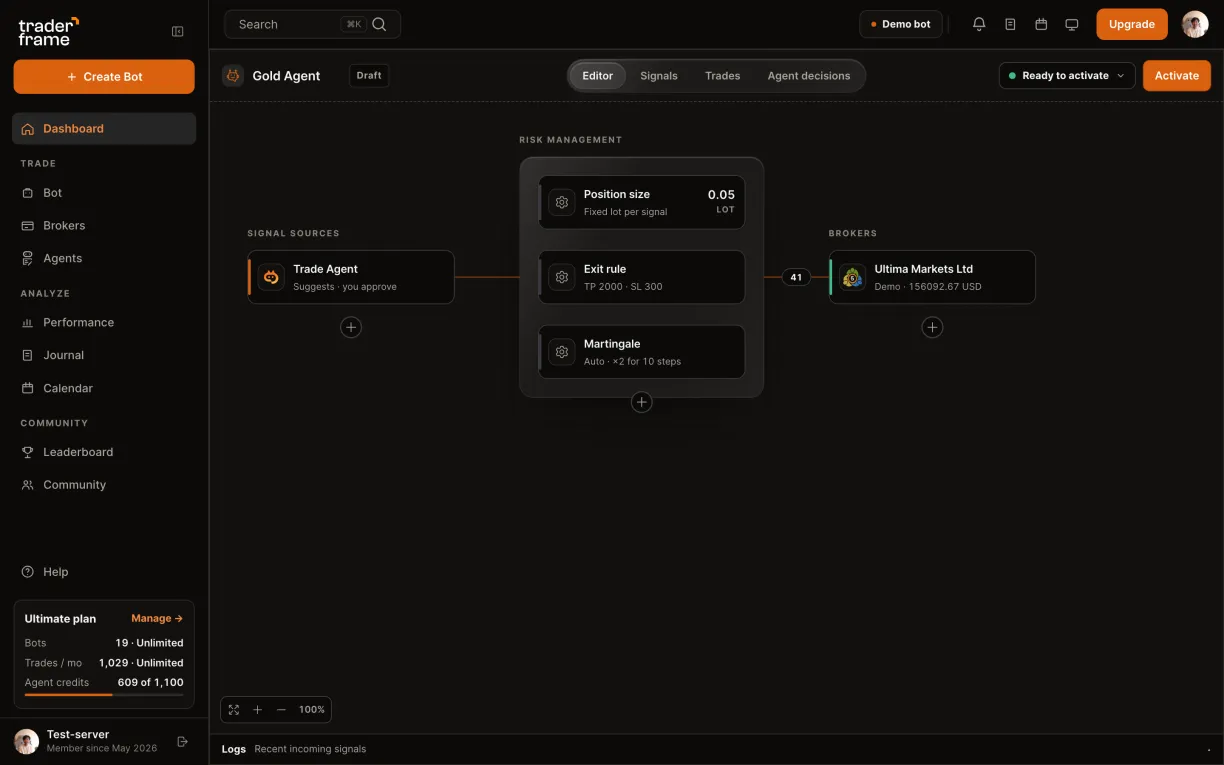
Choosing Claude Sonnet 5, then pressing Add the Trade Agent; the agent fills the Signal sources slot
6
in Trader Frame

Activate, then read its decisions

  • Press Activate. The agent takes its first look on the next candle close.
  • Open Agent decisions: every look is there, skips included, with its reason and what it cost.
  • A proposal waits for Place it or Skip until it expires. Grade its calls to teach a trained agent.

Engine skips say no credits used. Each day ends with a short report of what the agent saw, did and spent.
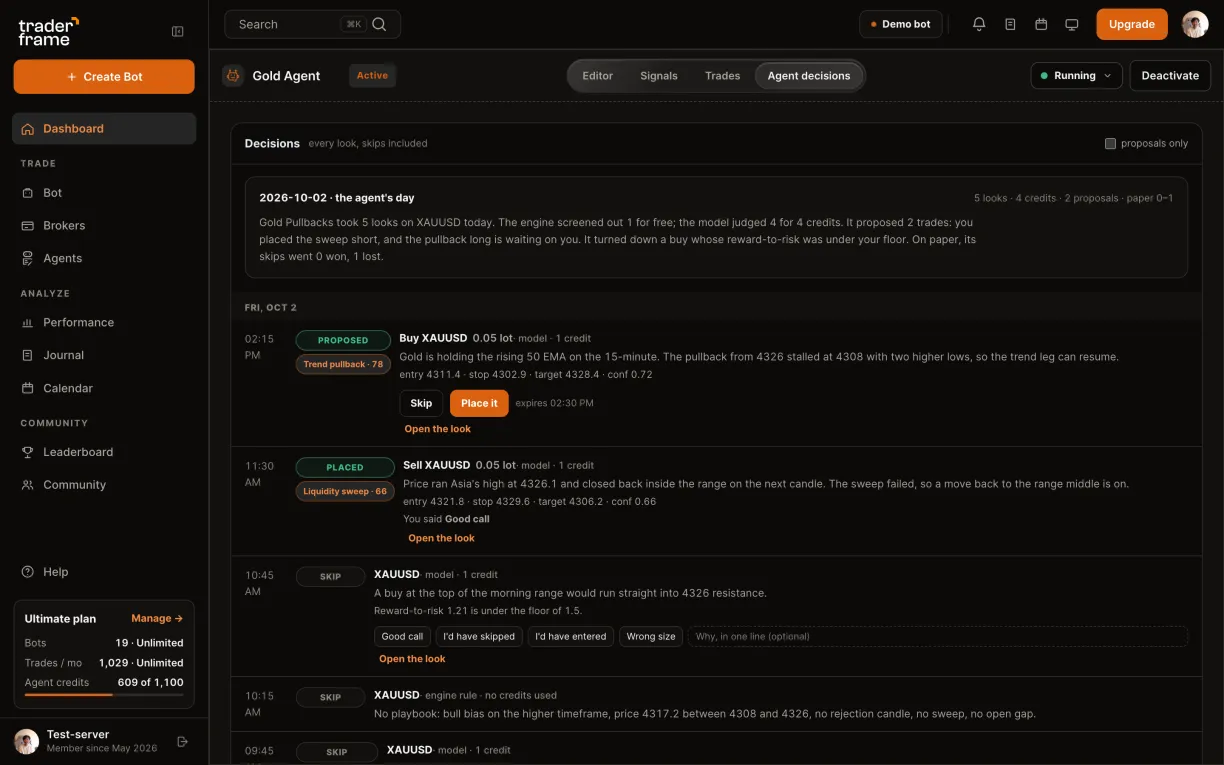
Activating the bot, then the Agent decisions tab: a proposal with Place it and Skip, a placed trade, and skips with reasons
agent credits

You pay in looks the model answers. Nothing else.

Credits refill each month with your plan. Packs top you up when a busy month runs over.

Plan
Credits / month
Agents
Free
—
No Trade Agent
Basic
50
Stock agent
Standard
150
Train your own in Agent Studio, 2 agents
Pro
400
Agent Studio
Ultimate
1,000
Agent Studio
Claude Sonnet 5 the default decider
1 credit a look
Claude Opus 5 the biggest model
5 credits a look
costs nothing
  • A look the engine skips: nothing on the table, outside your sessions, or a playbook you turned off
  • A model call that fails
  • Every look on your own model key
credit packs, any paid plan
100
credits · $15
1,000
credits · $49
3,000
credits · $129
10,000
credits · $349
faq

Trade Agent questions

Will it trade without asking me?

Only if you let it. On Suggest nothing is placed until you press Place it. Enter places entries within your hard limits; Manage also runs the open trade.

Can it widen my stop or size up after a loss?

It never widens a stop. On Manage, size follows the martingale ladder you set on the bot, and the engine holds every hard limit, including the daily loss stop.

Which brokers does it work with?

Suggest and Enter work on any broker you connect. Manage runs on MetaTrader 5 and crypto; on binary brokers it records what it would have done.

Can it check my TradingView or Telegram signals?

Yes. With Judge, every signal from the bot's other source waits for the agent, which takes it or skips it with a reason.

What does one look cost?

A look the model answers costs 1 credit on Claude Sonnet 5 or 5 on Claude Opus 5. Engine skips and failed calls are free, and so is every look on your own model key.

Can I train my own agent?

On Standard and up, Agent Studio builds an agent from your own rules and replays it on history. It earns Suggest, then Enter, from its record.

first look

Let it take its first look

Start on Suggest and a demo account. Read its decisions for a week, then decide how far it goes.